There are a lot of attention to detail on your core working area, let's take a look at some of them- edited ed
You can either hide the category manager or resize the category manager using the handles.
When working with Markdown editor, the preview pane helps to see the result, it comes with handles to hide and resize.
The fly-out menu's on Category managers helps to add categories and articles at desired places
The moment you start editing, the article will get locked (so others can't accidentally overwrite your content)
You have discussion option at every article level to collaborate with your team
A recipe has a market section that you must populate so LUSID can locate and retrieve suitable market data for each type of instrument you wish to value:
http://kb-2-public-project.localhost:4200/docs/5-basic-things-to-get-started#3-manage-articles
For simple exchange-traded instruments such as equities,
you are likely to require market prices held in the LUSID Quote Store. For complex exchange-traded or OTC instruments, you are likely to require interest rate, discounting or credit curves and/or volatility surfaces held in the LUSID Complex Market Data Store.
For any instrument (including a cash instrument) held in a different currency to the portfolio currency, you are likely to require FX rates held in the LUSID Quote Store.
Note: You can call APIs to check the quality/quantity of market data required for the valuation operation you are trying to perform. See how to do this.
By default, a recipe must be able to locate market data that is valid ~ one day prior to each date in the valuation schedule. The precise validity period is determined by the valuation time. For example, if you are valuing a portfolio containing a single equity on:
7 March 2022, the time defaults to 00:00:00 and the recipe must be able to locate at least one market price for that equity (and an FX rate, if applicable) effective 6 March 00:00:00 -> 7 March 00:00:00. Prices effective 5 March or earlier, or 7 March later than midnight are not valid.
7 March 2022 17:00:00, the recipe must be able to locate at least one market price effective 6 March 00:00:00 -> 7 March 17:00:00.
7 March 2022 23:59:59, the recipe must be able to locate at least one market price effective 6 March 00:00:00 -> 7 March 23:59:59.
In other words, there is an automatic look back, or ‘grace’, period of between 24 and 48 hours. You can specify an explicit quoteInterval to look back further than this if you wish (see below).
For each category of market data (that is, market price, FX rate, interest rate curve and so on) you are required to locate you should specify a market data rule in the marketRules array and/or groupedMarketRules array of the market section of your recipe. Consider the following example, of three market data rules in the marketRules array intended for a portfolio valuation on 7 March 2022:
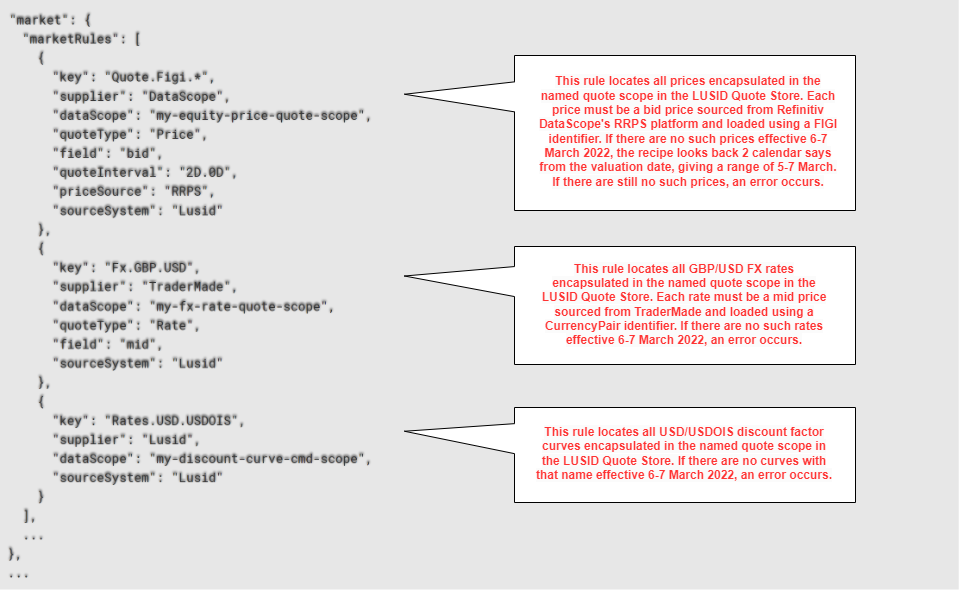
Note the following:
Each market data rule is self-contained and must contain all the information required to locate a particular category of market data in an appropriate store.
Market data rules are processed in order. The first matching rule found for a category of market data is used (as determined by its
key).You can provide multiple rules for the same
keyin order to provide fallback logic. For example, you could have two rules forQuote.Figi.*that are identical except the first has asupplierofDataScopeand the second asupplierofBloomberg. Prices from Refinitiv would be preferred, but the recipe would fall back to Bloomberg if no Refinitiv prices could be found.You can provide more sophisticated fallback behavior by specifying market data rules in the
groupedMarketRulesarray in addition to themarketRulesarray. More information.You can perform operations such as taking the highest or latest price from a group of providers, or even synthesising an average price, by specifying market data rules in the
groupedMarketRulesarray. More information.
For information on all the fields and allowed values in a market data rule, examine the API documentation (expand the configurationRecipe/market/marketRules section).
The following table summarises core fields; note in particular that:
The
keyfield defines the category of market data to locate.Given the category, all the other fields define the rule's criteria for retrieving appropriate data.
Market data rule field | Status | Applicable LUSID market data store(s) | Explanation | Matching market data field in store |
| Mandatory | Quote, Complex Market Data | A dot-separated string specifying the category of market data to locate, and implicitly the store in which to locate it. See this table for more information. | n/a |
| Mandatory | Quote, Complex Market Data | The market data vendor. This value must match the value of the market data |
|
| Optional | Quote, Complex Market Data | The sub-supplier to the market data vendor (above). This value must match the value of the market data |
|
| Mandatory | Quote, Complex Market Data | This value must match the |
|
| Mandatory | Quote | If the rule locates market data in the Quote Store, this value must match the value of the If the rule locates market data in the Complex Market Data Store, omit this field. |
|
| Mandatory | Quote | If the rule locates market data in the Quote Store, this value must match the value of the If the rule locates market data in the Complex Market Data Store, omit this field. |
|
| Optional | Quote, Complex Market Data | Specifies a 'look back' period for market data longer than the implicit default of You can use the Note if you choose | n/a |
| Optional | Quote, Complex Market Data | Defaults to | n/a |
The following table explains the key field in more detail:
Market data category | LUSID market data store |
| Examples | |
Quote Store |
|
| ||
|
| |||
Data loaded with |
|
| ||
Data loaded with |
|
| ||
Data loaded with |
|
| ||
Discount factor curve |
|
| ||
FX forward curve |
|
| ||
Interest rate projection curve |
|
| ||
Credit curve |
|
| ||
Equity volatility surface |
|
| ||
FX volatility surface |
|
| ||
Interest rate volatility surface |
|
| ||
When you call the GetValuation API, you may see a MarketResolverFailure similar to the one below if one or more market data rules fails to locate suitable market data in an appropriate store. The first step is to make sure field values in the market data rule match those in market data objects according to the table above. If they do, you can try setting the allowPartiallySuccessfulEvaluation pricing model option to True to relax validation and call the API again, though of course missing market data will not be used in calculations:
{"name":"MarketResolverFailure","errorDetails":[{"id":"Failed to resolve market data item [Provider: Edi, PriceSource: , InstrumentId: BBG000C05BD1, InstrumentIdType: Figi, QuoteType: Price, Field: mid].","detail":"Attempted to resolve with supplier [Edi] and sourceSystem [Lusid] in scope [recipe1] for effective date [07/03/2022 00:00:00], quoteInterval [None] and with predicate [AsAt=Latest], but failed because failed to find quote in store."}…]",…}Grouping market data rules and performing operations
You can specify market data rules in the groupedMarketRules array as well as, or instead of, the marketRules array:
You might specify market data rules in both arrays in order to provide sophisticated fallback behavior from a preferred supplier of quotes to a group of secondary suppliers.
You might specify market data rules in just the
groupedMarketRulesarray to perform an operation such as taking the most recent or highest price from a group of suppliers, or even synthesising an average price.
You can of course combine these use cases to perform operations on a group of secondary suppliers.
Consider the following example, of a market section with one market data rule for prices in the marketRules array and three inside a single group in the groupedMarketRules array, intended for a portfolio valuation on 7 March 2022. Note the operation on the group of rules is FirstLatest:
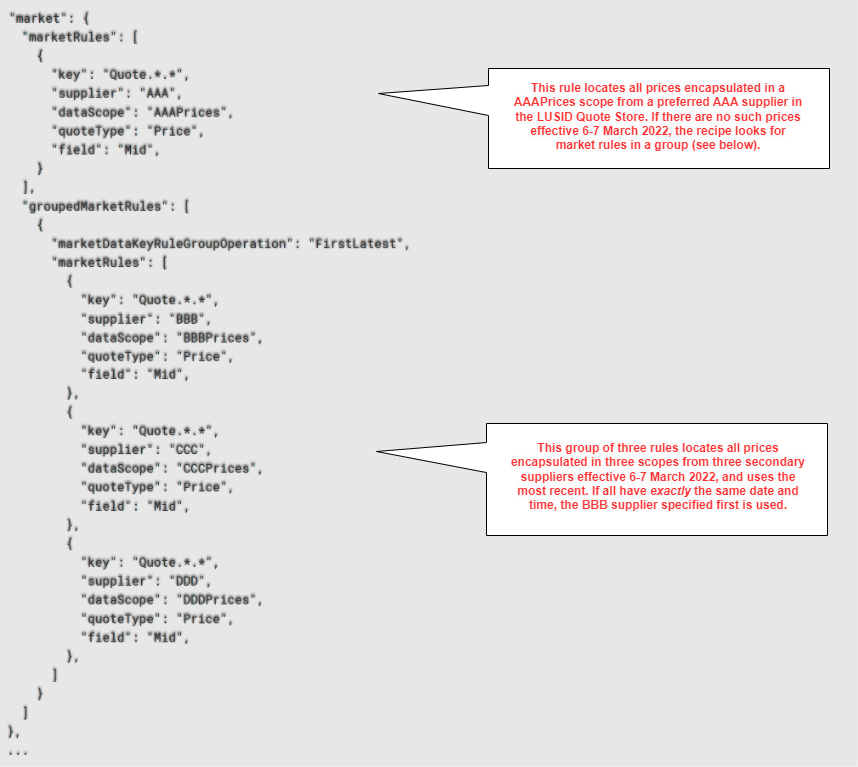
Note the following:
A recipe should have at least one market data rule in order to be functional. It can be in the
marketRulesarray, or on its own in a group in thegroupedMarketRulesarray.You can have any number of market data rules in the
marketRulesarray, and any number of rules in any number of groups in thegroupedMarketRulesarray.LUSID reads the
marketRulesarray first, then thegroupedMarketRulesarray.Within the
marketRulesarray, the order of market data rules is significant.Within the
groupedMarketRulesarray, the order of groups is significant. The order of market data rules within a group is significant in some circumstances, depending on the operation being performed.Within the
groupedMarketRulesarray, all market data rules must have the samekeyandquoteType. One exception is forquoteTypewith theFirstLatestoperation, where you can mix thePriceandDirtyPricequote types.LUSID uses the first matching rule found for a particular category of market data.
The following marketDataKeyRuleGroupOperations are available:
Operation | Explanation |
| The rule retrieving the most recent market data item (market price, FX rate and so on) is used. If all items were loaded with exactly the same date and time, the rule specified first in the group is used. |
| The rule retrieving the lowest value market data item is used. If all items have exactly the same value, the rule specified first in the group is used. |
| The rule retrieving the highest value market data item is used. If all items have exactly the same value, the rule specified first in the group is used. |
| These operations are different in that LUSID synthesises a new market data item rather than using a rule to retrieve an existing item. See the section below. |
|
Synthesising an average market data item
You can request that LUSID retrieves market data items from all the rules in a group and synthesises a new market data item representing an average:
Choose the
AverageOfAllQuotesoperation if you want the request to fail if a single rule in the group fails to retrieve a market data item.Choose the
AverageOfQuotesFoundoperation to ignore failures unless all rules fail to retrieve items.
For example, imagine you have upserted to the LUSID Quote Store the following three market prices for a particular stock:
Data field | Price #1 | Price #2 | Price #3 | Notes |
|
|
|
| |
|
|
| This field is optional when upserting. | |
|
|
|
| In order to synthesise an average, all instrument identifier types must be the same. |
|
|
|
| In order to synthesise an average, all values must identify the same instrument. |
|
|
|
| In order to synthesise an average, all quote types must be the same. |
|
|
|
| |
|
|
|
| |
|
|
|
| |
|
|
|
| In order to synthesise an average, all currency units must be the same. |
|
|
| This field is optional when upserting; it defaults to 1. | |
|
|
| This field is optional when upserting. | |
|
|
|
| This field is automatically populated by LUSID. |
|
|
|
| This field is automatically populated by LUSID. |
...and created a recipe with the following three market data rules in a group with the AverageOfAllQuotes operation:
"market": {
  "groupedMarketRules": [
    {
      "marketDataKeyRuleGroupOperation": "AverageOfAllQuotes",
      "marketRules": [
        {
          "key": "Quote.RIC.*",
          "supplier": "DataScope",
          "dataScope": "RefinitivPrices",
          "quoteType": "Price",
          "field": "open",
        },
        {
          "key": "Quote.RIC.*",
          "supplier": "Lusid",
          "dataScope": "LusidPrices",
          "quoteType": "Price",
          "field": "bid",
        },
        {
          "key": "Quote.RIC.*",
          "supplier": "Bloomberg",
          "dataScope": "BBGPrices",
          "quoteType": "Price",
          "field": "ask",
        },
      ]
    }
  ]
},
...
Assuming all three original market prices can be located, LUSID synthesises the following average price:
Data field | Synthesised value | Notes |
|
| The provider is always set to this value, irrespective of the original providers. |
|
| The prefix is |
|
| |
|
| |
|
| |
|
| The prefix is |
|
| The latest original datetime is used. |
|
| In this example, the original scale factors are different, so the synthesised value is unitised. The calculation is as follows: Original price #1: |
|
| |
|
| In this example, since the synthesised value is unitised, the scale factor is set to 1. If the original scale factors were the same and not 1, then this field is set to that scale factor. |
|
| The prefix is |
|
| The user is always set to this value, irrespective of the original users. |
|
| The as at datetime of the valuation operation is used. |
Note a synthesised market data item is not upserted to the Quote Store, so it cannot be retrieved by an API such as ListQuotesForScope. However, it is available in the manifest for a valuation operation.